
The capabilities below are implemented in the current platform. Availability in a particular installation depends on its models, connected services and device setup. Software access and demonstrations are arranged directly with the creator.
Start with a conversation
Ask a question, attach context, choose a role preset and get a streaming response. Keep several conversations available, return to earlier work and archive conversations when you’re finished.
A preset brings together a role, model and available capabilities. Give a coding task a different setup from a research or writing task. Enable the tools that are relevant to the work.
Chat and role presets.
Streaming responses, multiple conversations, archives and role presets. Choose the tools your agent can use for the task.
Arabic speech and transcription.
Arabic chat, speech input and read-aloud, with NAMAA speech generation and Whisper transcription when installed.
Files and Nextcloud.
Browse workspace files and connected Nextcloud storage. Select files as task context; connected services require configuration.
Python tools, MCP and skills.
Install Python tools, search online for MCP servers and skills, and select installed capabilities for each preset.
SHADO in VS Code.
Use the SHADO VS Code extension to chat with your configured server from the editor, with project context and role presets.
Local and cloud models.
Use local models or configure cloud providers. Choose models and capabilities to suit the work and your deployment.
DesktopBridge: an agent with a desktop
Connect a conversation to a supported desktop target: the host desktop, a sandboxed application environment or a remote desktop. Live viewing lets you see the environment your agent is interacting with.
- Host desktop: work with supported applications on the connected host.
- Sandboxed applications: use configured isolated application environments.
- Remote desktops: connect to configured remote targets.
The target, installed software and enabled capabilities determine what the agent can do. Review permissions and supervise consequential actions.
MobileBridge: mobile devices in the workflow
MobileBridge connects supported Android devices and virtual devices for live screen viewing and agent interaction. It brings mobile applications into the same environment as your other tools.
MobileBridge and the iPhone app serve different purposes. MobileBridge provides access to supported target devices. The iPhone app is a companion interface for using your SHADO server.
An iPhone companion
Connect to your SHADO server from your iPhone. Use conversations, switch presets and access the available tools and settings through a mobile interface.
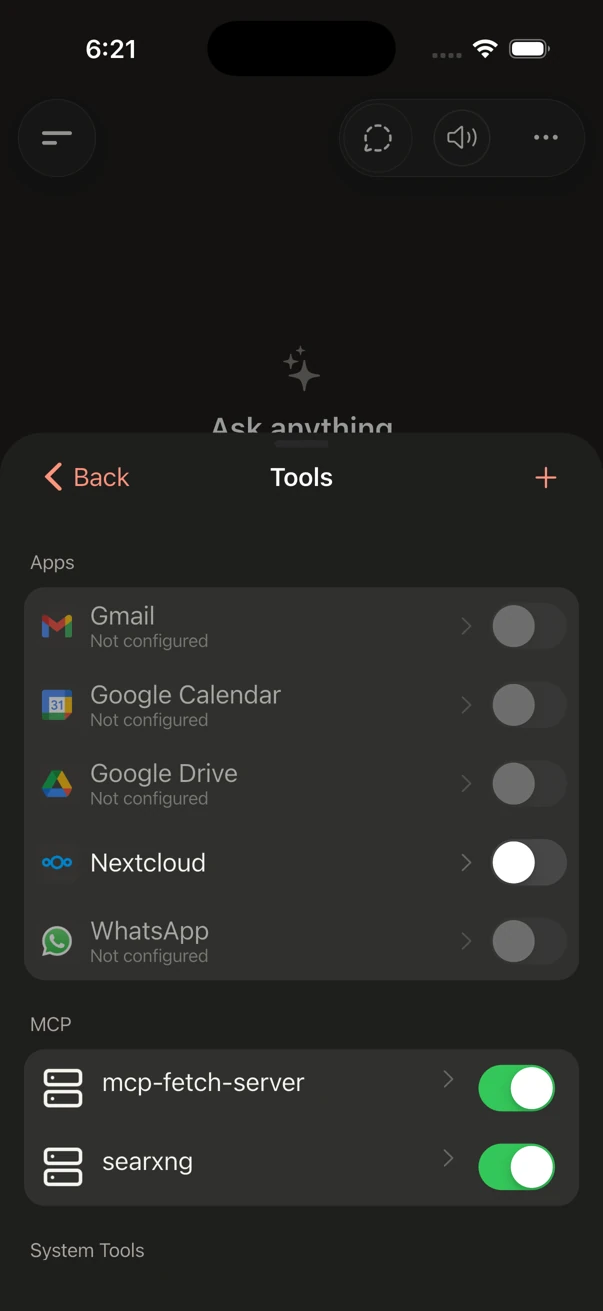
Actual dark-mode iPhone Simulator capture. Available services depend on your deployment and configuration.
Public App Store and Play Store downloads are not available through this website. No release date is announced; these buttons do not start a download.
Arabic voice and meetings
SHADO supports Arabic interaction through chat, speech input, read-aloud and transcription capabilities. Configure the speech engines and voices available in your deployment, including NAMAA and Whisper where installed.
Use transcripts as working material for summaries, follow-up notes and further analysis. Speech quality and processing speed depend on the selected engine, recording quality and available compute.
Files and connected applications
Browse workspace files and connected storage, including Nextcloud. App connectors provide access to configured email, calendar and storage services. They require separate accounts and authorization; showing an app in the catalog does not mean it is connected.
A self-hosted SHADO server can still connect to an external service. Review the information each integration receives before using it with sensitive work.
Tools, MCP and skills
Extend the assistant with Python tools, MCP servers and skills. Online search interfaces help you find MCP servers and skills; presets determine which installed capabilities are available to the agent.
- Python tools: add a self-contained tool implemented in Python.
- MCP: connect supported tool servers and their capabilities.
- Skills: add task-specific instructions and resources.
- Presets: combine a role, model and selected capabilities for a particular kind of work.
Third-party extensions have their own dependencies, permissions and licenses. Review an extension before installation and enable only the capabilities needed by the preset.
Coding and model choice
Use the dashboard or VS Code interface for coding assistance. Configure a coding preset and give it access to the authorized project and tools.
Choose local models or configured cloud providers. Model selection affects output quality, responsiveness, hardware needs and where information is processed. Explore deployment and data flow.